
Activate speakers, sponsors and exhibitors at every event, without chasing every event team.
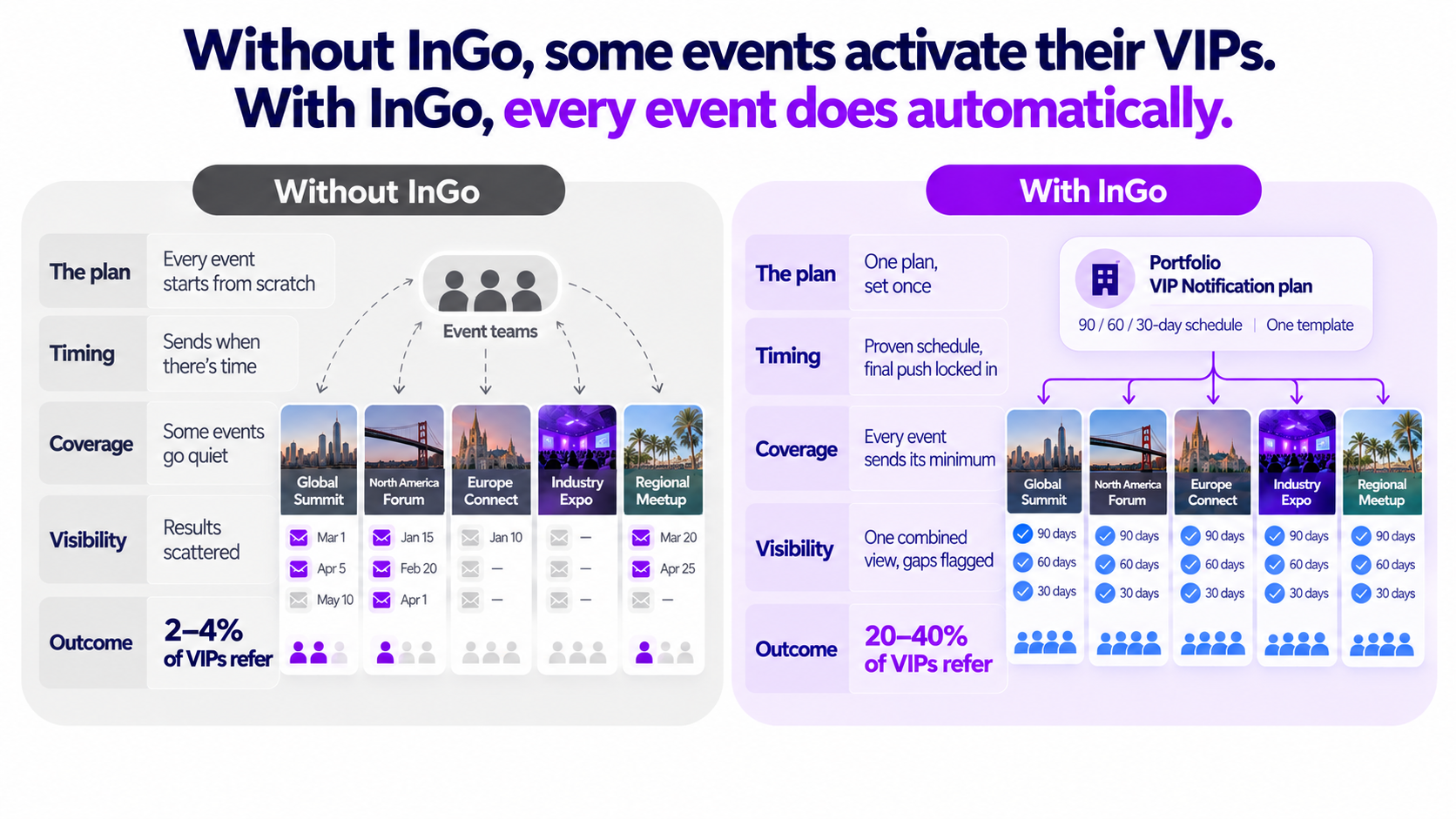
In brief: Most events only get referrals from 2–4% of their VIPs. With InGo, that rises to up to 50%, and VIP Notifications drive roughly a third of those results. Now you can set your VIP Notification plan once, at portfolio level, and every event in your portfolio follows it.
Go to Growth Reports > Execution > VIP Notifications to set your required sends, default schedule and template.
The growth event marketers don’t see
Every event has speakers, sponsors and exhibitors whose networks are full of the right people. More buyers, exhibitors and sponsors could have been in the room. But nobody motivated those advocates to share with their connections.
That’s the missed growth. And across your whole portfolio, it adds up fast.
More events, smaller teams
The events industry is having a real growth moment. Acquisitions mean fewer organizers now own more events. As AI fills our feeds, people want time in the room that’s relevant: specialized, regional, more intimate. So portfolios are consolidating at the top and multiplying at the edges, and every new event comes with its own audience, deadlines and growth target.
But the team behind it is rarely getting bigger. We hear the same goals from event leaders every week:
- Grow attendance without growing the budget.
- Beat pre-COVID numbers with fewer people.
- Get every speaker, sponsor and exhibitor asked to share by Monday.
When each event team builds its own referral campaign from scratch, something gives. Some events run a brilliant campaign. Others go quiet, simply because there wasn’t time. The advocates were there, but nobody asked them.
One plan. Every event. No chasing.
Our API integrations took care of setup. Events are created in InGo automatically, and your speakers, sponsors, exhibitors and attendees sync straight from your registration platform.
But getting VIPs into InGo is only half the job. They still need to be asked to share, at the right moments, at every event.
With portfolio-level VIP Notification requirements, you decide once how your events activate their VIPs, and InGo makes sure it happens everywhere. No more chasing each event team to send.
- A guaranteed minimum: Choose how many VIP Notifications every event must send, so no event goes quiet.
- Your schedule, your way: Use InGo’s proven default timing or set your own send dates for every community.
- A protected final push: Lock in the sends that matter most, like 90, 60 and 30 days out, when people are most likely to register.
- One look and feel: Choose a branded HTML email, or a personal plain-text email for stronger deliverability, and every event uses it.
- Live events included: One click applies your plan to the events you’re already running.
Event teams can still add their own sends on top. The required sends simply make sure the essentials never slip.
Built for teams running more than one community
Set the plan once on your parent community and every child community follows it, whether your events span brands, regions or business units. Add VIP Notifications to every community’s plan in one click, then see results from your whole portfolio in one combined view.
If an event falls behind, the “Events Needing Execution” section shows you exactly where, before it costs you advocates.
The growth impact: more advocates at every event
When every event reminds its VIPs at the right moments, more speakers, sponsors and exhibitors share. Their networks hear about your event from someone they trust, and the right people end up in the room.
That’s how our customers get up to 50% of their VIPs sharing, and over 10x what other referral tools deliver. Across a portfolio, it compounds: every community performs, not just the few with time to chase. Because results roll up into one view, you can see exactly how much growth your advocates drive, event by event and across the whole portfolio.
Ready to put your plan in place?
Already an InGo customer? If you are an Admin, go to Growth Reports > Execution > VIP Notifications to set your required sends, default schedule and template. In a parent community, those settings apply to all its communities.
Not the Admin? Forward this to them, or email support@ingo.me to find out who it is for your community. For step-by-step instructions, click here.
Not yet an InGo customer? Book a demo to see how InGo activates speakers, sponsors and exhibitors across every event, and how many more advocates you could be reaching.